Lab: Files & File Encodings
This is the second of this week’s two short labs; the first is Downloading a Video. Like that one, it is graded on what you produce, here, a correctly re-encoded file, rather than on a test badge turning green.
This lab drops you into a few historical situations where you have to write Python to read non-English files. Along the way you will practice using data that ships inside a repo, writing relative file paths, loading text that is not in English, and following a real Python tutorial.
Starter code: github.com/rtealwitter/lab-encodings

Getting started
Fork and clone the starter repo, then cd into it and check the contents with ls:
$ git clone https://github.com/<your-username>/lab-encodings
$ cd lab-encodings
$ ls
files  img  part2  README.md  dprk-unicode.md
$ ls files
shanghai_communique.chinese1      shanghai_communique.english
shanghai_communique.chinese2      shanghai_communique.gb2312
shanghai_communique.chinese.utf8  shanghai_communique.txt
The lines without a $ prompt are the expected output; match them against your own to confirm the download worked. To a working programmer it is obvious these commands need to run, so real documentation usually leaves them out; this is close to the last time a lab will spell them out for you.
The rest of the lab describes a computing problem in English and asks you to type Python to solve it, using the files in this folder.
Part 1: reading historical documents
In 1972, President Richard Nixon flew to China.
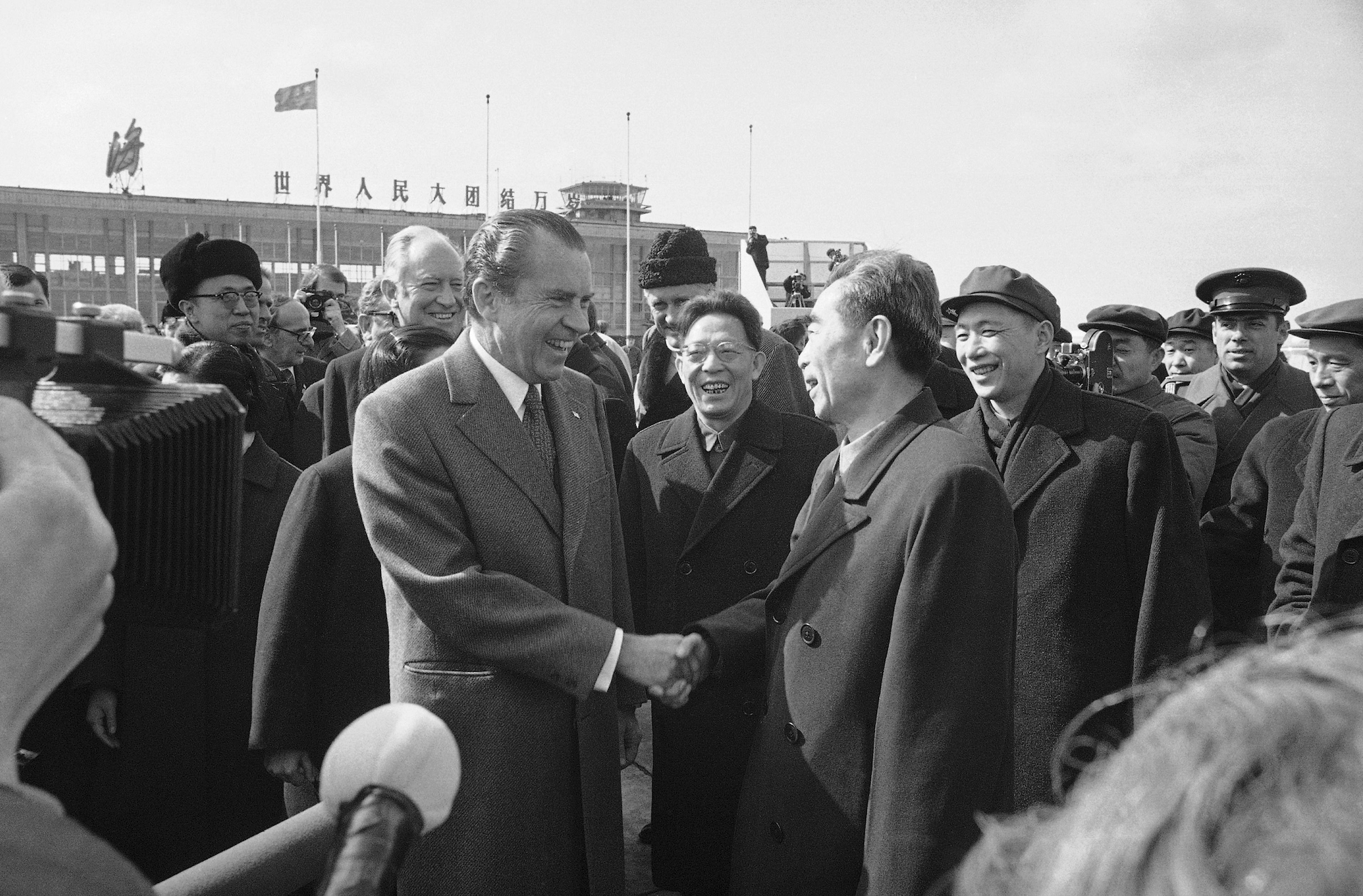
The Shanghai Communiqué was a joint statement by the United States and the People’s Republic of China, famous for first stating the US “One China” policy. The official English version was stored as ASCII text, and you have a copy in files/shanghai_communique.english. Open it in VS Code to confirm you can read it, then read it from Python:
>>> f = open('files/shanghai_communique.english', encoding='ascii')
>>> text_english = f.read()
>>> print(text_english[:1000])
The document scrolls past starting with JOINT COMMUNIQUE ... February 28, 1972 ... Shanghai. Notice the relative path: shanghai_communique.english lives inside the files folder, so the path is files/shanghai_communique.english; drop the folder and you get the FileNotFoundError from the reading. The encoding='ascii' argument tells open which table converts the file’s bytes into letters.
When the communiqué was written there was no encoding for Chinese text, so the Chinese translation could not be stored on a computer at all. The PRC eventually built one: in 1980 they released GB2312, the first standard for encoding Chinese characters. The file files/shanghai_communique.chinese1 holds a Chinese translation in GB2312. Open that file in VS Code and you will see garbage, because VS Code does not know the GB2312 encoding. Python can read it once you name the encoding:
>>> f = open('files/shanghai_communique.chinese1', encoding='gb2312')
>>> text_gb2312 = f.read()
>>> print(text_gb2312[:1000])
Both the path and the encoding changed from the English version.
How the encodings work
ASCII pairs each English letter with one byte. The letter A is 65, which is 0x41 in hexadecimal, and you can check both directions in Python:
>>> 0x41
65
>>> b'\x41'.decode('ASCII')
'A'
The b'\x41' is a bytes object, raw numbers rather than text, which is why we call .decode to turn it into the letter A. GB2312 works the same way but spends two bytes per Chinese character (a Hanzi). For example, the Hanzi 友 (“friend”) is the two bytes \xd3 and \xd1:
>>> b'\xd3\xd1'.decode('gb2312')
'友'
Two bytes can distinguish tens of thousands of characters, which is plenty for the roughly 3000 Hanzi in everyday modern use.
When one encoding is not enough
GB2312 was designed for the simplified characters used in mainland China, and it does not cover the traditional characters used in Taiwan. Taiwanese programmers built their own system, Big5, and the two are not compatible. That incompatibility causes two problems.
First problem: the same bytes are illegal in the other encoding. The file files/shanghai_communique.chinese2 holds the same communiqué encoded in Big5. If you try to open a GB2312 file as Big5 (or the reverse), some byte will not be a legal character in the other table, and Python raises a UnicodeDecodeError, exactly the error from the reading.
One idea is to try one encoding and fall back to the other if it fails. The following function does that with try/except, which we will study properly next week:
def load_chinese_file(filename):
    # open in binary mode ('b'): reading raw bytes, no encoding yet
    f = open(filename, 'br')
    bs = f.read()
    try:
        text = bs.decode('gb2312')
        print('gb2312')
    except UnicodeDecodeError:
        text = bs.decode('big5')
        print('big5')
    return text
Save this as chinese.py in the project folder (not inside files), then start Python with the file preloaded:
$ python3 -i chinese.pyNow one call loads either kind of file, printing the encoding it detected and returning the text:
>>> text1 = load_chinese_file('files/shanghai_communique.chinese1')
gb2312
>>> text2 = load_chinese_file('files/shanghai_communique.chinese2')
big5
Those lines print the encoding, not the contents; the contents were returned into text1 and text2, so print(text1) shows the document.
Second problem: the same bytes are legal in both encodings but mean different things. The two bytes for 友 (“friend”) in GB2312 are the two bytes for 衭 (“the front of a shirt”) in Big5:
>>> b'\xd3\xd1'.decode('gb2312')
'友'
>>> b'\xd3\xd1'.decode('big5')
'衭'
So b'I love \xd3\xd1' reads as “I love friends” or “I love shirts” depending on the encoding, and no error warns you. This is why you cannot reliably guess an encoding from the bytes alone, and why VS Code refuses to try.
Unicode ends the mess
Since the 1980s, dozens of competing Chinese encodings appeared, which made it hard for Chinese speakers to exchange files at all. The Unicode Consortium was founded in 1991 to give every character in every language a single number that works everywhere. Its three standard encodings, UTF-8, UTF-16, and UTF-32, can all represent Chinese, and since around 2000 UTF-8 has become the default nearly everywhere:
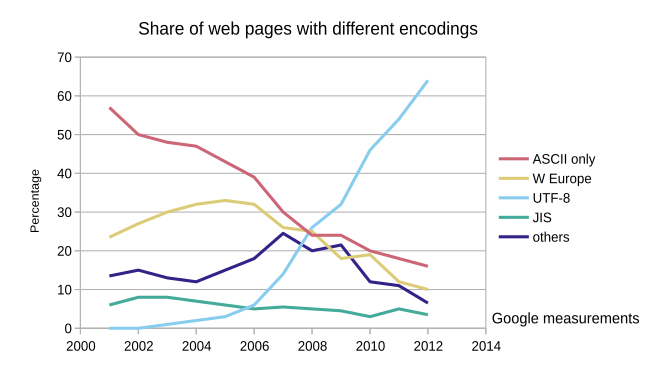
The chart tracks encodings used on the web, and UTF-8 climbs past every older scheme within a decade. The PRC required GB2312 for official documents until 2017; today the large majority of Chinese websites serve UTF-8.
A small piece of history: seven emoji in the current standard were added at North Korea’s request. The DPRK first proposed that ☕ be called HOT TEA, but an American suggested a more general name so it could also mean coffee, the North Koreans agreed, and it shipped as HOT BEVERAGE. Narrow technical cooperation like this sometimes runs ahead of what diplomats can manage; the repo’s
dprk-unicode.mdhas more, drawn from the original author Mike Izbicki’s own work helping the DPRK adopt Unicode.
Part 2: decode the intercepted message
For the rest of the lab you are an analyst at the US State Department.

A US government employee is leaking classified plans for nuclear submarines to the Brazilian government, and a field agent has intercepted a message about where the leaker will next meet their Brazilian contact. The message is in part2/secret_message.txt, encoded in a Brazilian encoding you cannot read yet:
>>> f = open('part2/secret_message.txt', 'rb')
>>> f.read()
b'\xc1\x95\xa3\xcb\x95\x89\x96k@\x85\x95\x83\x96\x95\xa3\x99\x85`\x94\x85@\x95\x81@\x85\x94\x82\x81\x89\xa7\x81\x84\x81@D@\x94\x85\x89\x81`\x95\x96\x89\xa3\x85@\x84\x85@\xa3\x85\x99H\x81`\x86\x85\x89\x99\x81K%'
Your job is to decode the message so the FBI can reach the meeting. This scenario is real: in 2019 a US Navy engineer tried to sell Virginia-class submarine plans to Brazil, Brazil tipped off the US, and the FBI made the arrest.
Hint. The full list of encodings Python knows is in the codecs documentation. Brazilians write in Portuguese, so try the encodings meant for Western Europe. There are only nine of them, so trying each is quick. The decoded message is in Portuguese; run it through Google Translate if you are curious, but you do not have to.
Submitting
Create the file part2/secret_message.utf8 holding the decoded message, saved in UTF-8. Saving a new file in VS Code gives you UTF-8 automatically, so open a new file, paste the decoded text, and save it at that exact path; the location matters for full credit. Then commit part2/secret_message.utf8 into your fork, push it to GitHub, and submit your fork’s URL on Gradescope. There are no doctests for this lab, so it is graded on your decoded file being in the right place with the right contents.