Lab: Password Cracking
This is the second of this week’s two labs; the other is Cowsay (pip and linters). Password cracking puts try/except to work for real, breaking into encrypted zip files by guessing passwords and catching the failures along the way. Do them in either order.
In computer science, hacking is a compliment: it means building clever things. Cracking is the other one, the breaking-into-things that non-programmers usually mean when they say “hacking”.
This lab is your first taste of cracking: you will break the password on an encrypted zip file with Python, and see that the tools are the same ones you already use for building. Along the way you will review writing a program from scratch, opening zip files in Python, and using try/except to handle the failures.
Starter code: github.com/rtealwitter/lab-password-cracking
Setup
Fork the starter repo to your account, then clone your fork and cd into it. It ships with the zip files you will be prying open.
Opening zip files in Python
Python opens password-protected zip files with the built-in zipfile module. Start a new file with this:
from zipfile import ZipFile
with ZipFile('guido_secrets.zip') as zf:
    password = b'BFDL'
    zf.extractall(pwd=password)
A few things to notice. After it runs, a new file guido_secrets/secrets.txt appears; that is a relative path, a folder guido_secrets with a file secrets.txt inside it, and it is worth making sure you can see why the file lands exactly there. The file holds a poem, The Zen of Python, which every Python programmer should read at least once, so open it in VS Code and do.
The password is a bytes object (b'BFDL'), not an ordinary str. Zip passwords are raw bytes, and while they usually spell out ASCII text, they do not have to. Change b'BFDL' to the plain string 'BFDL' and you get a TypeError, which should make sense now that you have met a few. You can convert a string to bytes with .encode, so 'BFDL'.encode('ascii') gives the same value as b'BFDL'. Now change the password to anything other than BFDL and run it again: you get an error (RuntimeError, BadZipFile, or zlib.error, depending on your system), and any files it does create will hold garbage rather than the real contents.
Zip bombs
Zip files can be genuinely dangerous, because of something called a zip bomb. Antivirus software routinely opens zip files to scan inside them, and opening the wrong one can take a machine down: decompressing it can fill the entire hard drive.
The file 42.zip in the repo is only 42 KB, but unzipped it expands to 4.5 petabytes, roughly 4.5 million gigabytes. (It is password-protected so you cannot set it off by accident; the password is 42 if you are feeling brave.) Worse is quine.zip, which contains an exact copy of itself.
Antivirus tools that open zips inside zips will unpack quine.zip forever, always finding another copy of the same file within. It is safe to open by hand, and worth doing once: unzip it and inside you find the same zip again, and again. Python has no built-in protection against zip bombs, so never open an untrusted zip file from Python.
The scenario
For this lab, pretend it is 2015 and you are an analyst at the GRU, the Russian military-intelligence agency. One of your agents has risked their life to bring you whitehouse_secrets.zip, stolen from a White House IT worker and said to hold details of the upcoming US presidential election. Your job is to open it, but the file is encrypted and you do not have the password. You do have leads.
In July 2015, the affair-oriented dating site Ashley Madison was breached and its entire user database leaked onto the internet.
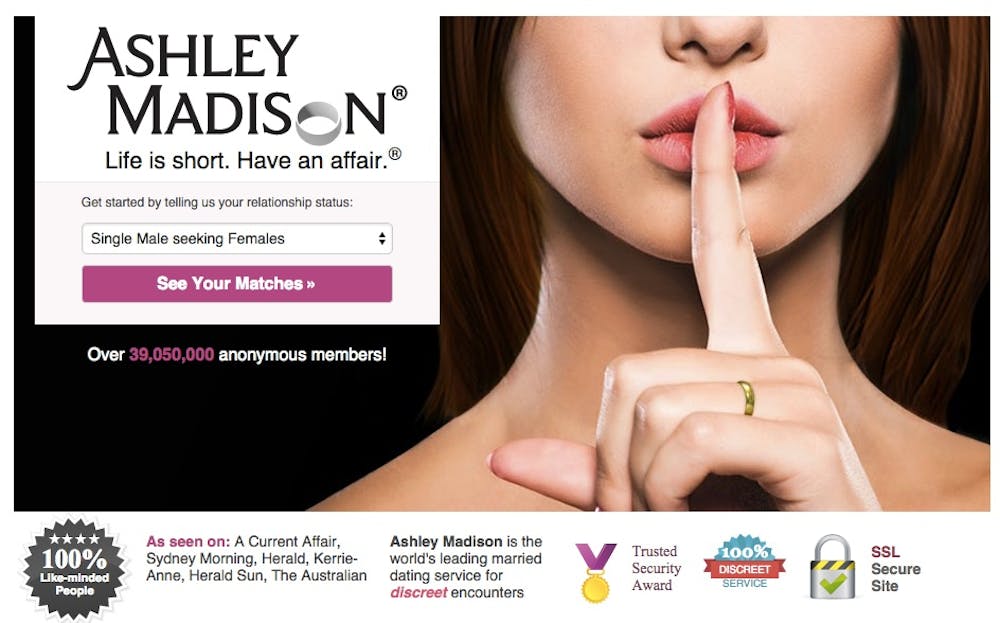
Notice the badges on that homepage promising the data is safe and encrypted; those claims are almost always marketing, and this leak became the classic example of hacktivism. The White House IT worker who made the zip was an Ashley Madison user, and like most people they reused a single password everywhere, so one of the leaked passwords will open the file. You just have to work out which one.
This scenario is not invented. Defense One reported that 45 White House staffers and more than 10,000 military personnel had Ashley Madison accounts, and the Associated Press confirmed a White House IT staffer among them.
Your tasks
The SecLists repository collects security datasets, including the Ashley Madison passwords at
Passwords/Leaked-Databases/Ashley-Madison.txt. Download that file.Write a program
password_cracker.pythat finds the zip file’s password. It should:- Open
Ashley-Madison.txtand build a list calledpasswordsholding every password in the file. - For each password in
passwords, try openingwhitehouse_secrets.zipwith that password; if it opens successfully, print the password. - When the file finally decrypts, you will have a new
whitehouse_secrets/secrets.txtcontaining the secrets. - Commit both
password_cracker.pyandwhitehouse_secrets/secrets.txtto your repo and push them.
Hint. Use a
try/exceptto tell whether the zip opened, and do one thing on success and another on failure. This is exactly the loop-skip pattern from the reading: try each password, catch the failure, move on. Watch for two traps from earlier in this lab: a zip password must bebytes, so.encode()each one before you try it, and a line read from a file keeps its trailing newline, so.strip()it off first, otherwise the true password silently never matches.Hint. There are a lot of passwords, and trying them all takes five to ten minutes, so print a progress line every 10,000 iterations (the current count and password) to confirm the program is still moving. Because the passwords are sorted alphabetically, how far into the alphabet you are tells you roughly how close you are to done.
- Open
(Optional, but recommended.) Stop reusing passwords across sites. Memorize them, or use a password manager. According to Snowden the NSA can guess up to a trillion passwords a second, and even an ordinary laptop running John the Ripper manages millions, so pick passwords that are genuinely hard to guess; XKCD 936 has a good method.
Submitting
There is no test badge on this one; the proof is the decrypted file. Keep running your cracker until it prints the password and produces whitehouse_secrets/secrets.txt, commit that file alongside password_cracker.py, and submit your repository link on Gradescope.