Lab: War Dialing
Starter code: github.com/rtealwitter/lab-wardialing
In this lab you will war dial every web server in the DPRK (North Korea) and count how many web servers the country has connected to the internet.

Is this allowed?
War dialing sounds scary, and people who do not work with computers often assume it is a bad thing to do, some kind of cracking or black-hat hacking. In the computer science world it is perfectly normal and white hat. All it does is connect to every computer in a region of the internet and ask each one for a webpage. Search engines like Google war dial the entire internet constantly to find new websites for their results. To make the process sound friendlier, the generation of search engines before Google (Yahoo!, AltaVista, and the rest) renamed war dialing to “spidering,” and that is still the word Google uses for it today. We will keep calling it war dialing.
Many security companies sell reports telling customers how many times they have been scanned this way, which is one of the easier ways to frighten a client into an overpriced security contract. The reality of the modern internet is that every computer connected to it is scanned regularly.
Learning objectives.
- Review the
requestslibrary. - Review working with exceptions.
- Learn how to monitor the internet connectivity of a country or organization.
- Practice “learning how to learn” by reading about network technology we have not covered in class.
What is war dialing?
War dialing is the process of scanning a segment of the internet to list every computer in it. The name comes from the movie WarGames, in which David Lightman uses war dialing to stumble onto a US military nuclear-control computer:

WarGames is one of the films you can watch for the course’s caveat task, and this is a good week to watch it while the lab is fresh in your mind.
There is a great Stack Overflow discussion of how realistic the movie is. The short version: the technical details of war dialing in the film are correct, but the US has never connected nuclear command and control computers to the internet, precisely to prevent the scenario the movie imagines. You can find plenty of public information about US networks for classified information, such as SIPRNet (for operations classified SECRET), JWICS (TOP SECRET), and NSANet (TOP SECRET/SCI). Nuclear secrets may be shared on some of these, but nuclear command and control infrastructure is required to be air gapped from every network, even the most exclusive ones, to keep exactly this kind of remote attack impossible.
Wikipedia shows what a workstation looks like for someone who works with classified systems:
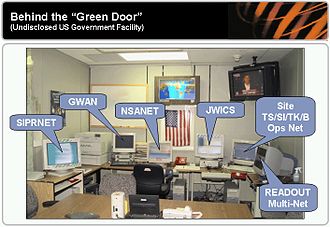
There is a separate computer for each network, and they are physically disconnected from each other, so that a software bug on one can never leak top-secret information onto the internet.
A little history. WarGames came out in 1983, before the internet existed. At the time computers connected to each other by calling over ordinary telephone lines, so David Lightman scans the phone numbers of a region to find the “online” computers there. Today computers use the IPv4 protocol, which was first deployed to an early internet called the ARPANET in 1983, the same year the movie was released. Dial-up internet, which connects an ordinary phone line to the IPv4 internet, was invented in 1992.
IP addresses and domain names
An IP address is four 8-bit numbers separated by periods, and just like a domain name it can host a website. To see this, visit https://142.250.68.14 and notice that you are redirected to https://google.com: that address is one of Google’s. You can reach any server either by its IP address directly or by its more human-readable domain name.
Whenever you use a domain name, the browser uses the Domain Name System (DNS) to look up the matching IP address before it makes the actual connection. The IP address is what is needed to contact a computer, because it is tied to the server’s physical location; your ISP has to know where a site physically lives in order to route your request there. The site https://www.geolocation.com gives a readable view of where an address is: look up 142.250.68.14 and you will see Google’s server sitting in Mountain View, California.
Finding your own IP address. You will need your own IP address for this lab. Visit https://whatismyipaddress.com/ to find it. If you are on a shared or campus network, many computers are likely sharing one address through a technology called Network Address Translation (NAT). NAT exists because there is only a limited supply of IPv4 addresses; we are running out, and new addresses are becoming expensive.
Finding an organization’s IP addresses. To war dial an organization you first need all of its IP addresses, which is public information. The site https://ipinfo.io maps an organization to the addresses it owns. Every organization on the internet has an Autonomous System Number (ASN), and from the ASN you can list all of its IP addresses: for example Google is AS15169. To find the addresses for a whole country, visit https://ipinfo.io/countries and click one; it lists every ASN registered there. The United States has over 30,000 ASNs, the most of any country; the DPRK has exactly one, the fewest of any country.
The DPRK’s IP addresses. The DPRK’s lone ASN belongs to the Ryugyong-dong ISP, listed at AS131279. Its addresses are given under the netblock field of the “IP Address Ranges” table, which looks something like:
| Netblock | Company | Num of IPs |
|---|---|---|
| 175.45.176.0/24 | Ryugyong-dong | 256 |
| 175.45.177.0/24 | Ryugyong-dong | 256 |
| 175.45.178.0/24 | Ryugyong-dong | 256 |
| 175.45.179.0/24 | Ryugyong-dong | 256 |
Each number in an IP address is 8 bits, so it ranges from 0 to 255. The /24 on each netblock is a subnet mask. Fully understanding subnet masks takes a bit of discrete math, but the /24 here means Ryugyong-dong owns the next 256 addresses, every IP whose last number runs from 0 to 255. Across all four netblocks, the DPRK owns every address from 175.45.176.0 through 175.45.179.255, which is 1024 addresses in total. Because every server on the internet needs its own address, at most 1024 servers from the DPRK can be online at once. In the rest of this lab you will write a Python program that connects to each of those addresses to see which are hosting a webpage.
Programming instructions
1. Connect to a known DPRK site. Start with http://kcna.kp, the site of the Korean Central News Agency, the official newspaper of the DPRK. The .kp is the country-code top-level domain for the DPRK, so anything ending in .kp is somehow owned by the country.
Whenever you scrape a webpage, view it in your browser first, to be sure there are no connection problems on your end. That way, if Python later throws an error, you know it is a Python error and not an internet problem. Open http://kcna.kp in the browser now.
Note on
http://versushttps://. The scheme above ishttp://, nothttps://. If you visit https://kcna.kp you get a scary security warning, because the KCNA site uses an old encryption standard that is vulnerable to a man-in-the-middle attack. Mike Izbicki, who wrote this lab, has taught North Korean students how to implement modern encryption, and has helped fix parts of the KCNA site so that it could be indexed by Google and archived by the Internet Archive, which lets diplomats and analysts learn about the DPRK more easily. Organizations like Amnesty International and Human Rights Watch consider strong encryption a human right. For our purposes the practical takeaway is short: if you get a connection error, first check that you usedhttp://and nothttps://.
Now confirm you can reach the site from Python:
import requests
r = requests.get('http://kcna.kp')
print('r.status_code=', r.status_code)
If everything worked, you should see:
r.status_code= 2002. Connect by IP address instead of domain name. Find the IP address for http://kcna.kp by visiting https://whatismyip.live/dns/kcna.kp; it will look like 175.45.176.XXX with the XXX filled in. As always, try the address in your browser first, at http://175.45.176.XXX, and you should see the KCNA page. Then connect from Python, replacing XXX with the right numbers:
import requests
r = requests.get('http://175.45.176.XXX')
print('r.status_code=', r.status_code)
Again you should get:
r.status_code= 2003. Handle addresses with no server. We can now reach a server given its IP address, but what happens when no server is listening at an address? The address 175.45.176.10 is a DPRK address with no web server on it. Try to connect to it:
r = requests.get('http://175.45.176.10')After about a minute you get a long error ending in something like:
requests.exceptions.ConnectTimeout: HTTPConnectionPool(host='175.45.176.10', port=80): Max retries exceeded with url: / (Caused by ConnectTimeoutError(...'Connection to 175.45.176.10 timed out.'))By catching this exception with try/except, you can tell whether a server exists at a given address. This is still slow, because requests.get can wait a very long time for a reply that will never come. Read the documentation and find how to make the call wait at most 5 seconds for a response (search the page for the word “timeout”). Five seconds is long enough to be confident a real server would have answered, but short enough that scanning finishes in a reasonable time.
4. War dial. Fork and clone the starter repo, github.com/rtealwitter/lab-wardialing, then open wardial.py and complete the functions marked with FIXME. The file breaks the job into small pieces you can test one at a time:
is_server_at_hostname(hostname)returnsTrueifrequests.getcan connect to the hostname (you add the scheme, and set the 5-second timeout from step 3).increment_ip(ip)returns the next IPv4 address, handling wrap-around like'1.2.3.255'to'1.2.4.0'.enumerate_ips(start_ip, n)returns the nextnaddresses starting atstart_ip.
Each function comes with doctests; write the body until the doctests pass. Then use enumerate_ips to build the list of all 1024 DPRK addresses, and filter that list down to the ones running a web server with is_server_at_hostname. The completed program prints every DPRK IP address that is hosting a web server.
Hint. Scanning is slow: 1024 addresses, up to 5 seconds each, is over an hour in the worst case, so print each address as you scan it to watch your progress. Expect the final count to land somewhere between 10 and 50. This is also a fine time to watch WarGames while your program runs.
You may notice that this final filter is exactly the accumulator loop from the reading, so you can write it either as a loop or as a one-line list comprehension:
dprk_ips_with_servers = [ip for ip in dprk_ips if is_server_at_hostname(ip)]Real war dialers do all 1024 connections in parallel and finish in seconds; an ordinary laptop can scan the entire internet of 4.2 billion addresses in under an hour that way. Parallel programming is hard, so here we do the slow, sequential version.
Running the tests and submitting
This lab follows the same loop as every other lab in the course. Run the doctests from your terminal:
$ python3 -m doctest wardial.pySilence means every test passed; while a test is failing, the output shows exactly what it Expected and what it Got, so you always know which function to fix next. Because the scanning code at the bottom of the file takes a long time to run, keep it out of the doctests by guarding it so it only runs when you run the file as a script:
if __name__ == '__main__':
    ...
Once the doctests pass, your submission repository must contain:
- your completed
wardial.py, and - a
README.mdwith a one-sentence description of the project and the list of DPRK IP addresses that host web servers, shown as a terminal codeblock of the command you ran and its output:
$ python3 wardial.py
dprk_ips_with_servers= ['175.45.176.xxx', '175.45.177.xxx', ...]
This lab is graded a little differently from the doctest labs: there is no autograder badge, because the scan hits live servers and takes far too long to run inside GitHub Actions. Instead you are graded on your completed wardial.py and the list of live servers shown in your README.md, so make sure your scan actually finished before you paste its output in. Push your work, then submit the URL of your repository on Gradescope.
Shodan
Read this section; there is nothing to submit.
shodan.io is a search engine for IP addresses that fully automates the war dialing you just did by hand, along with many other scanning tasks. It has a ready-made list of every device on the DPRK’s addresses, which includes more than web servers, so it returns a few more results than your scan will.
One unsettling thing about Shodan is that it also scans servers for known security holes. In the North Korea results you can find servers with known remote code execution (RCE) vulnerabilities, one of the worst kinds, which let anyone who knows the right technique take over the machine completely. North Korea has been accused of hosting malware on its own sites, but the security firm Kaspersky found evidence that a non-North-Korean actor had taken over the pages instead; The Hill covers the policy angle. If you dig through results like these for any organization, you can often find internal tools that were never meant to be public.
There is a good written tutorial on Shodan, and some talks from DEFCON, a hacking conference with an unusual mix of academic researchers, black-hat criminals, and FBI agents all presenting side by side: [1] [2].