Syntactic Sugar
Earlier this term we made Python reach outside itself: exceptions let a program keep going when something failed, and web scraping let us pull data off pages we did not write. Both topics leaned on the same shape of code, the accumulator loop: start with an empty list, walk over some items, and append the ones we care about. It works, but it takes four lines to say something simple, and you have been writing that shape ever since, in the scraper, and again in every tool you handed to docchat. Today is about writing it shorter.
Syntactic sugar is a shorter notation for a common pattern. The name describes the feature: it makes a common idiom shorter to write without adding new power to the language. Anything you can write with sugar you could also write the long way; the sugar just reads better once you know it. Python is famous for having a lot of it.
Every piece of sugar corresponds to a longer form that the computer actually runs, and translating the short form back into the long one is called desugaring. Desugaring is the one skill you need for the whole topic: when a piece of sugar confuses you, write out the loop it stands for and read that instead.
Sugar we have already used
You have been using syntactic sugar since your very first loop, because a for loop is itself sugar for a while loop. Here is a counting for loop over range:
for i in range(5):
    print(i)
It desugars into a while loop that manages the counter by hand:
i = 0
while i < 5:
    print(i)
    i = i + 1
Both print 0 through 4. The for version says the same thing with none of the bookkeeping: no starting the counter at 0, no remembering to add 1, no getting the < versus <= wrong. That is what good sugar buys you, a common pattern written without the parts you always get wrong.

The meme is right, and it points at a small hierarchy worth holding onto: a while loop is more powerful than a for loop, which is more powerful than the list comprehension we are about to meet. “More powerful” means it can express more. A while loop can repeat on any condition at all; a for loop can only walk through a sequence; a comprehension can only build a list. The surprising part is that less power is usually what you want. The weaker tool says more about your intent, so a reader knows at a glance that you are only building a list and not doing something sneaky. Reach for the least powerful tool that does the job, and save while for when you genuinely cannot say how many times you will loop.
You have met smaller sugars too. Back in the factorial function we wrote result = result * i; Python lets you shorten that to result *= i, and +=, -=, and friends work the same way. None of these let you do anything new, they just cut the repetition out of a line you write constantly.
List comprehensions
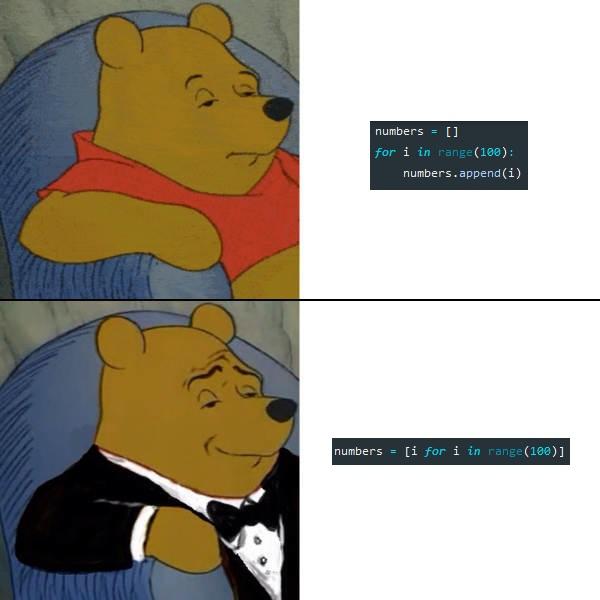
The accumulator loop that ran through the scraper almost always does one job: take every item in a list and transform it into a new item. Here we greet everyone in a list of names:
names = ['alice', 'bob', 'charlie', 'dave', 'eve']
greetings = []
for name in names:
    greetings.append('hello ' + name)
start with an empty list, walk over names, and append one greeting per name. Four lines, and the only interesting part is 'hello ' + name; everything else is the same ceremony every time.
A list comprehension collapses exactly this pattern into a single line:
greetings = ['hello ' + name for name in names]It produces the same list, which we can check in the REPL:
>>> ['hello ' + name for name in names]
['hello alice', 'hello bob', 'hello charlie', 'hello dave', 'hello eve']
From the inside out, for each name in names, compute 'hello ' + name, and collect the results into a list. The general shape is [COMPUTATION for VARIABLE in LIST], and it desugars straight back into the loop we started with:
accumulator = []
for VARIABLE in LIST:
    accumulator.append(COMPUTATION)
Keep that desugaring in your pocket. Any time a comprehension looks like a puzzle, write out those three lines and the puzzle disappears.
Here is a second example, the squares of the first ten numbers:
>>> [x*x for x in range(10)]
[0, 1, 4, 9, 16, 25, 36, 49, 64, 81]
For each x from 0 to 9, compute x*x; range(10) supplies the sequence to walk. A useful rule for reading other people’s code: any time you see the keyword for inside square brackets, you are looking at a comprehension.
Filtering
Often you do not want every item, only the ones that pass a test. The scraper did this constantly: given a pile of scraped rows, keep the ones that matched. A comprehension filters by adding an if to the end. Here we keep only the short words in a sentence:
>>> sentence = 'This is an example sentence with a few words in it.'
>>> [word.lower() for word in sentence.split() if len(word) <= 2]
['is', 'an', 'a', 'in']
split() breaks the sentence into words, the if len(word) <= 2 keeps only the short ones, and word.lower() transforms each survivor. The shape is now [COMPUTATION for VARIABLE in LIST if CONDITION], and it desugars into a loop with an if nested inside:
accumulator = []
for VARIABLE in LIST:
    if CONDITION:
        accumulator.append(COMPUTATION)
The condition can be any expression Python reads as true or false, and Python treats 0 and empty things as false and everything else as true. That is why x % 2 works as an is-odd test: the remainder is 1 (true) for odd numbers and 0 (false) for even ones. So we can keep the squares of just the odd numbers:
>>> [x*x for x in range(10) if x % 2]
[1, 9, 25, 49, 81]
The reason comprehensions turn up everywhere in data code is this filter. Given a list of records, keeping the ones that match is a single line: [t for t in tweets if 'trump' in t['text'].lower()] picks out every tweet that mentions Trump. You will write lines shaped exactly like that whenever you clean or search a dataset.
When to stop
Comprehensions can nest inside each other and chain several for clauses, which lets you build a list of lists, or flatten one, all on a single line. You can; whether you should is where taste comes in, and the honest answer is usually no. Here is a nested comprehension that builds a list of lists:
>>> [[i for i in range(x)] for x in [2, 3, 4] if x % 2 == 0]
[[0, 1], [0, 1, 2, 3]]
By the second opening bracket you are decoding, not reading. The desugaring rules still save you (peel a nested comprehension from the outside in, and read stacked for clauses left to right), but if you have to desugar your own code to understand it, the plain loop was clearer.
So here is the rule of thumb. One transformation, with an optional filter, is the sweet spot: reach for a comprehension and it will read better than the loop. Anything hairier, a nested comprehension, a second for, or real work in the body, and you should write the loop out. This is the power hierarchy from before in practice: the comprehension is the least powerful and clearest tool for the simple case, and the loop takes back over the moment the job stops being simple.
A little more sugar
There is more sugar worth picking up on your own, and the most useful piece is that the same bracket trick works for dictionaries. A dictionary comprehension builds a dict with {key: value for ...}:
>>> {name: len(name) for name in names}
{'alice': 5, 'bob': 3, 'charlie': 7, 'dave': 4, 'eve': 3}
For each name we make one entry mapping the name to its length. Swap the square brackets for curly braces and the single computation for a key: value pair, and everything you already know about list comprehensions carries straight over.
A few other things you have already used are sugar too: the f-strings you have been using since the scraper are sugar for gluing strings together, and the with block that closed your files for you is sugar for a try/finally you would otherwise write by hand. The Real Python guide to list comprehensions, the DataCamp tutorial on dictionary comprehensions, and Corey Schafer’s video cover these and set comprehensions and generators besides. Working through references like those on your own is the “learning how to learn” that the rest of the course keeps asking of you.
Looking forward
This week’s lab, war dialing, is the first place the sugar makes real code shorter. You will scan all 1024 IP addresses the DPRK owns and count how many are running a web server, reusing requests and try/except from the web-scraping and exceptions weeks. The heart of it is one accumulator loop, walking the list of IPs and keeping the ones that answer:
dprk_ips_with_servers = []
for ip in dprk_ips:
    if is_server_at_hostname(ip):
        dprk_ips_with_servers.append(ip)
That is one transformation and one filter, the exact case comprehensions are best at, so the whole loop collapses to a line:
dprk_ips_with_servers = [ip for ip in dprk_ips if is_server_at_hostname(ip)]Head to the lab to write it, and to find out how many computers North Korea keeps online.
Next class we learn regular expressions, a pattern language that turns a question like “find every phone number in this file” into a single line of code.