Lab: APIs and Web Interfaces
Starter code: github.com/rtealwitter/lab-fastapi
In this lab we put an LLM behind a web interface. Part 1 walks through how APIs and web servers actually work, using reddit’s API, an LLM API, and a small FastAPI server. Part 2 has you add a web interface to a classmate’s LLM project. The FastAPI library we use here is the same one the SQL reading used to serve a database, and the same one behind the final project, so this lab is also practice for that.
To get started, fork the starter repository to your own account, then clone your fork, change into it, and install its dependencies:
$ git clone https://github.com/<your-username>/lab-fastapi
$ cd lab-fastapi
$ pip3 install -r requirements.txt
Part 1: web servers and APIs
Using an API
An API (Application Programmer Interface) is just a webpage that returns JSON instead of HTML. The subreddit /r/ProgrammerHumor is full of the memes shown in class, and reddit will hand the same content to a program as JSON.

The endpoint is the URL that returns the JSON. For a reddit page you get the endpoint by adding .json to the end of the URL, so the endpoint for that subreddit is https://www.reddit.com/r/ProgrammerHumor.json. Open it in your browser and you will see a wall of JSON:
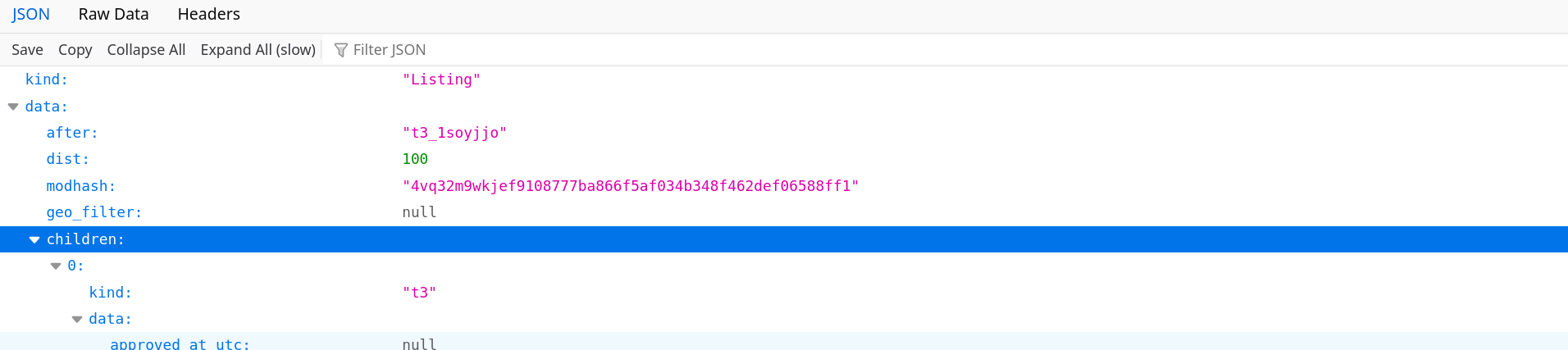
The exact meaning of every field does not matter. The point is that we can pull everything reddit would show us straight out of the API, with no scraping at all.
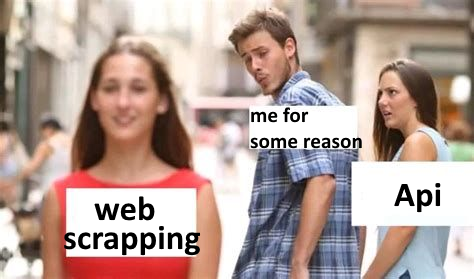
This is worth remembering the next time you reach for a scraper. For example, eBay provides a free API, and using it replaces all the scraping work from the earlier project with a single call to the API endpoint.
curl
curl is the standard shell tool for working with APIs, and all it does is download a webpage and print its contents to the screen. We can pull reddit’s JSON from the terminal with it:
$ curl https://www.reddit.com/r/ProgrammerHumor.jsonYou will see the same JSON printed in your terminal. The site https://cheat.sh/python is another handy example, a plain-text Python cheatsheet you can read in the browser or fetch with curl:
$ curl https://cheat.sh/pythonTalking to an LLM API
Many programmers use curl to talk to LLM APIs too. The Groq quickstart guide has a shell section whose command looks like this:
curl -X POST "https://api.groq.com/openai/v1/chat/completions" \
    -H "Authorization: Bearer $GROQ_API_KEY" \
    -H "Content-Type: application/json" \
    -d '{"model": "llama-3.3-70b-versatile", "messages": [{"role": "user", "content": "Explain the importance of fast language models"}]}'
There is more inside this command than a URL. The -H headers handle authentication (logging in with your $GROQ_API_KEY) and declare that we are sending JSON, and the -d data carries the messages we are passing to the model. Copy the current command from the quickstart guide into your shell and run it, and you will get back a large JSON object with many fields; find the text the model responded with.
That raw object is hard to read, so pass it through Python’s built-in JSON formatter with a pipe:
$ curl <insert_curl_params_here> | python3 -m json.toolThe output starts something like this:
{
    "id": "chatcmpl-c76ad728-221c-4d25-aa71-78272358c9b0",
    "object": "chat.completion",
    "created": 1777047642,
    "model": "llama-3.3-70b-versatile",
    "choices": [
        {
            "index": 0,
            "message": {
                "role": "assistant",
                "content": "Fast language models are crucial for various applications..."
Notice that this JSON has the same shape as the Python response object from your LLM project, where you read the reply with response.choices[0].message.content.
A chat web interface
Look closely at the URL you just curled: https://api.groq.com/openai/v1/chat/completions. The openai in the path is there because Groq implements the OpenAI-compatible API. Every modern provider (OpenAI, Anthropic, openrouter.ai, and the rest) implements the same API, so any tooling built around it works with any of them.
People have built custom chat interfaces on top of that API that do far more than the standard chat website, such as editing the conversation directly, adding and removing tools, or sending a query to several models at once; oobabooga and open-webui are two well-known ones. We will use a simpler interface from gradio. The gradio_server.py file in the repo connects to any OpenAI-compatible endpoint, so we can point it straight at Groq:
$ python3 gradio_server.py --url=https://api.groq.com/openai/v1 --apikey=$GROQ_API_KEY
* Running on local URL:  http://127.0.0.1:7860
Visit the address it prints (probably http://127.0.0.1:7860), have a short conversation with the chatbot, and confirm everything works. The :7860 on the end of the address is a port: you will have several servers running at once, and the port says which one to connect to. A single computer has 2**16 = 65536 ports, so it can run that many servers at a time.
Your own OpenAI-compatible endpoint
If we build our own OpenAI-compatible endpoint, all of that tooling works with our program for free. Programmers have loved reusing each other’s code since long before ChatGPT came along.
The endpoint.py file is a small OpenAI-compatible endpoint written in FastAPI (the name comes from its being built for making APIs quickly). Run it:
$ python3 endpoint.py
INFO:     Uvicorn running on http://127.0.0.1:8000 (Press CTRL+C to quit)
Open the file and you will see it defines four routes, each a path you can connect to with curl or a browser: /, /spanish, /latin, and /v1/chat/completions. The first three just return a greeting:
$ curl http://127.0.0.1:8000/
hello world
$ curl http://127.0.0.1:8000/spanish
hola mundo
$ curl http://127.0.0.1:8000/latin
salve munde
Because those examples are curl sessions, showing you how the routes work took nothing more than pasting a terminal session, with no long-winded explanation about clicking through menus. The fourth route is the chat endpoint, which you reach with a POST request carrying a message:
$ curl -X POST http://127.0.0.1:8000/v1/chat/completions -H "Content-Type: application/json" -d '{"messages":[{"role":"user","content":"hello"}]}'
{"id":"chatcmpl-123","object":"chat.completion","created":0,"model":"unknown","choices":[{"index":0,"message":{"role":"assistant","content":"this is response number 1"},"finish_reason":"stop"}],"usage":{"prompt_tokens":0,"completion_tokens":0,"total_tokens":0}}
Now that we have our own endpoint, we can put the same gradio interface in front of it. Keep endpoint.py running in one terminal, then in a second terminal start gradio_server.py pointed at it:
$ python3 gradio_server.py --url=http://127.0.0.1:8000/v1
* Running on local URL:  http://127.0.0.1:7860
Visit the gradio address and you can chat with your own endpoint. This endpoint is a mock: it does not call an LLM at all and just returns a canned response no matter what you type. That is fine here, because the thing we are testing is the web connection, not the model.
Part 2: a web interface for a classmate’s project
Now we will add a web interface to an LLM project, but not your own: a classmate’s.
- Fork your partner’s project and clone it to your laptop. It does not matter which branch you use; the
master/mainbranch has their working project-3 code, and the project-4 agent code lives on theagentbranch, so either gives you something to run. - Copy
gradio_server.pyandendpoint.pyfrom this lab into the clone. - Modify
endpoint.pyto use your partner’sChatclass instead of the mock. The file is written to make this easy: you should only have to change theimportline so it imports theirChatrather than the one frommock_chat.py. - Verify the conversation works, and that a question like “what does the README say this project is about?” correctly uses the project’s tool calls to answer.
- Take a screenshot of a conversation that shows the bot working.
- Commit and push your changes, then open a pull request to your partner’s project; your partner must accept it.
Submitting
Most labs in this course are auto-graded doctests that you run until they pass and resubmit until every test is green. This one is different: it is graded on what you build and hand in. On Gradescope, submit the screenshot of your working conversation and a link to the accepted pull request on your partner’s project.