Lab: Capture the Flag
This is the capstone, and it is the one lab in the course with no autograder, no starter repo, and no points you are required to earn. It is optional extra credit, the send-off the Last Day reading promised, and it combines the security skills the term has been building.
Here is the thesis in one line: you cannot defend a system you cannot attack. You already know this from both directions without having said it out loud. Back in the password-cracking lab you sat in the attacker’s seat, brute-forcing a weak password until a stranger’s zip file fell open, and the lesson only landed because you were on offense. The Last Day reading flipped that same coin to defense: the SQL injection bug you have to hunt out of your own Twitter clone. This lab makes you hold both sides of the coin at once. You will break a login with SQL injection, capture the flag hidden behind it, and then patch the exact hole so the same attack bounces off.
Optional / extra credit. Nothing here is required and skipping it costs you zero points. It is worth a little extra credit, it is genuinely fun, and it is the sharpest way to make the SQL injection lesson permanent. Bring your writeup and be ready to explain how your exploit works.
One piece of vocabulary before we start. In security, a capture-the-flag challenge hides a secret string, the flag, somewhere only a working exploit can reach. You prove you broke in by pasting the flag back out. No flag, no proof. Our flags look like CTF{...}, and there are two of them.
The target
Every real breach starts with a line of code somebody wrote without thinking about who would read it. Here is the archetype, the single most common one on the internet: a login route that builds its SQL query by gluing the user’s input straight into a string.
"SELECT * FROM users WHERE username='" + name + "' AND password='" + pw + "'"For an honest user this works fine. The problem, as the reading warned, is that the user controls exactly what lands inside those quotes, and nothing stops them from sending something that is not a username at all.
To attack it you need a copy of it running. Below is a tiny, self-contained target: a whole vulnerable web app in about thirty lines. It keeps a throwaway database in memory with two users, bob and admin, each guarding a flag, and each with a strong random password you are not meant to know. Save it as ctf_target.py.
# ctf_target.py -- a DELIBERATELY vulnerable login. Run it ONLY on your own machine.
import sqlite3
import uvicorn
from fastapi import FastAPI, Form
from fastapi.responses import HTMLResponse

# A throwaway in-memory database with two users, each hiding a secret flag.
# check_same_thread=False lets FastAPI's worker threads share this one connection;
# we only ever read from it, so that is safe here.
db = sqlite3.connect(':memory:', check_same_thread=False)
db.execute('CREATE TABLE users (username TEXT, password TEXT, flag TEXT)')
db.executemany('INSERT INTO users VALUES (?, ?, ?)', [
    ('bob',   'S6p!nwQ2zx8L', 'CTF{single_quotes_are_a_skeleton_key}'),
    ('admin', 'k9$Rf7vT1mAe', 'CTF{a_dash_dash_walked_past_the_password}'),
])
db.commit()

app = FastAPI()

FORM = '''
<h2>CS40 CTF login</h2>
<form method="post">
  <input name="username" placeholder="username">
  <input name="password" placeholder="password" type="password">
  <button>Log in</button>
</form>
'''

@app.get('/', response_class=HTMLResponse)
async def form():
    return FORM

@app.post('/', response_class=HTMLResponse)
async def login(username: str = Form(''), password: str = Form('')):
    # NEVER build a query like this. Gluing user input into SQL is the whole bug.
    sql = "SELECT username, flag FROM users WHERE username='" + username + "' AND password='" + password + "'"
    row = db.execute(sql).fetchone()
    if row:
        return FORM + f'<p>Logged in as <b>{row[0]}</b>. Flag: <code>{row[1]}</code></p>'
    return FORM + '<p>Wrong username or password.</p>'

if __name__ == '__main__':
    uvicorn.run(app, host='127.0.0.1', port=8000)
It is the same FastAPI shape from the backend reading: two routes at the same path /, a GET that shows the form and a POST that checks the login. The only interesting difference is the flag column, which the login hands back once you are in. Install the three libraries and run it:
pip3 install fastapi uvicorn python-multipart
python3 ctf_target.py
Then open http://127.0.0.1:8000 in your browser. (If port 8000 is busy because your own Twitter clone is running, change the number in the last line.) Try logging in as bob with the password password. It fails, as it should, because you do not know Bob’s password. That is the front door, and it is locked. We are going in through the query.
Warning. Run this only against your own copy on your own machine. Attacking a computer you do not own or have written permission to test is a crime in the US under the Computer Fraud and Abuse Act. “With permission” is the entire line between a bug-bounty payout and a felony, so stay on your side of it.

Break in
Go to the login form and, in the password box, type exactly this, then submit:
' OR '1'='1You are logged in, and a flag appears. Read what your input did to the query the server built:
SELECT username, flag FROM users WHERE username='bob' AND password='' OR '1'='1'Your leading ' closed the password string early, and OR '1'='1' bolted a condition onto the WHERE clause that is true for every row in the table. AND binds tighter than OR, so the database reads it as “(right username and empty password) or this-is-always-true,” takes the always-true branch, and returns every user. The server calls .fetchone(), grabs the first row, and logs you in as whoever that is: bob. No password required. You captured bob’s flag by rewriting the question instead of answering it.
That trick got you a login, but not a chosen one. For that, aim at the username box. Log out, and this time type into the username field:
admin'--Put anything at all in the password box. Now you are admin, holding the second, better flag. Here is why:
SELECT username, flag FROM users WHERE username='admin'--' AND password='...'The -- begins a SQL comment, so the database throws away the entire rest of the line, password check and all. What actually runs is SELECT username, flag FROM users WHERE username='admin', which returns exactly Bob’s boss. Swap in bob'-- and you land on bob instead; the comment bypass lets you pick your victim by name.
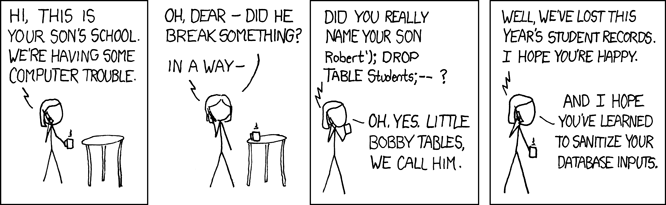
Capture both flags. While you are here, type a lone ' into either box and submit: the query becomes malformed, and you get a SQL error in the terminal (an Internal Server Error in the browser). That error is not a bug in your attack; it is the tell that your keystrokes are reaching the query as code, which is precisely the hole you are exploiting.
Patch it
Now switch chairs. You have proven the login is broken, so fix it, and confirm the fix with the same attacks that just worked. The repair is the one-line discipline from the reading: never let user input into the query’s structure. Hand the query and the values to execute separately, marking each slot with a ? placeholder and passing the actual values in a tuple. Change only the two lines inside the login route:
@app.post('/', response_class=HTMLResponse)
async def login(username: str = Form(''), password: str = Form('')):
    sql = "SELECT username, flag FROM users WHERE username=? AND password=?"
    row = db.execute(sql, (username, password)).fetchone()
    if row:
        return FORM + f'<p>Logged in as <b>{row[0]}</b>. Flag: <code>{row[1]}</code></p>'
    return FORM + '<p>Wrong username or password.</p>'
Restart the server and rerun both exploits. ' OR '1'='1 in the password box now fails. admin'-- in the username box now fails. sqlite3 treats each ? as a slot for one value and nothing else, so it goes looking for a user literally named admin'--, finds nobody, and denies the login. The quotes and the comment marker lose every ounce of their power because they never touch the query’s grammar; they are just weird characters in a string that does not match. An honest login with a real password still works, because honest data was always just data.
The parameterized query is the complete fix for this injection bug, and the same pattern is used in production applications. It is the same ? placeholder from the SQL injection section of the backend reading, and it is exactly what stands between a passing final project and a -10 point penalty: a Twitter clone I can break with this attack loses ten points. Every execute call in your project needs the treatment you just applied here.

Go further (optional)
You just ran the training version. The real thing is waiting, and it is the same move aimed at a live target.
The reading’s send-off was Stripe’s old Capture the Flag competition, a ladder of websites each with a planted vulnerability, where breaking one level opens the next. Level 3 of the 2012 CTF is a small Flask app hiding the exact SQL injection you just practiced. Download it, log in as bob without his password, and come explain your exploit. It is old code that expects Python 2, so you will fight the setup a little; that is part of the exercise. If you catch that bug and want a lifetime of harder ones, the current competitions are indexed at ctftime.org.
And it pays. Companies run bug bounty programs that invite anyone in the world to find a real vulnerability, report it privately, and collect a check, often thousands of dollars, while they fix the hole. Stripe, which moves billions of dollars in payments, runs one on HackerOne, and platforms like it have routed hundreds of millions of dollars to ethical hackers over the years. Breaking systems for the people who own them, with permission and a paycheck, is a real career, and you now own the entry-level version of the skill it runs on.

Submitting
This capstone is optional extra credit, submitted by hand on Gradescope. There is no autograder and no badge to turn green; the proof is that you can show your work. Hand in a short writeup containing:
- the injection strings that worked,
' OR '1'='1andadmin'--, with a sentence each on why they worked, - both captured flags,
- the patched query, and a line on why the
?placeholder defeats the same attack.
A screenshot of the flag on screen is welcome alongside the writeup, and if you took the real Stripe CTF further, say so.
Step back and see the whole arc close. This lab is the exact defensive mirror of the password-cracking lab that opened the offense chapter of the term, and the vulnerability you broke and repaired here is the same one your own Twitter clone is graded against. You spent this course refusing to do boring things by hand, and the creed still holds on the last day: laziness is good, boredom is evil, so automate the boring stuff. Writing one careful line of parameterized SQL, once, so that no attacker ever rewrites your query for you, is the laziest and least boring thing you will do all term.
Now go break something you own, and then make it sturdier. Grab a byte.