Exceptions
Last class we reached outside the program for the first time, opening real files and reading real text off the disk. That is also where our programs started to fail in a new way. Code that only computes with numbers we typed ourselves either works or has a bug we can track down. Code that reaches into the outside world fails for reasons that are not our fault: the file is missing, the webpage changed overnight, the line of input is garbage. Today is about what Python does when it hits one of those failures, and how we stop a single bad input from taking down the whole program.
The failures have a name, exceptions, and dealing with them is really two skills at once. The second skill is debugging: reading what Python tells you when something breaks, and acting on it.

Every programmer lives that four-panel strip. The skill worth building is getting from the first why to oh, that’s why quickly, and Python hands you more help for that than you might expect.
Reading a traceback
When Python runs a line it cannot finish, it does not guess and it does not skip ahead. It halts the program and prints a traceback: its report of what went wrong and where. The quickest way to see one is to ask for something impossible, like dividing by zero:
>>> 1 / 0
Traceback (most recent call last):
  File "<stdin>", line 1, in <module>
ZeroDivisionError: division by zero
Read a traceback from the bottom up, because the last line is the one that matters. ZeroDivisionError is the type of the exception, and division by zero is the message spelling out what happened. The indented lines above it are the call stack, naming the file and line number where the failure occurred. Here that is line 1 of the interactive prompt; in a real program it points at the exact line of the exact file, which is usually all you need to find the problem. Left alone, an unhandled exception ends the program then and there, and every line after the failing one is skipped. Controlling that behavior is the rest of today.
The errors you will actually meet
Each exception type names a different kind of mistake, and you will meet the same handful over and over. Here are the ones worth recognizing on sight:
| Exception | When it happens |
|---|---|
FileNotFoundError |
opening a file that isn’t there: open('missing.txt') |
KeyError |
asking a dictionary for a key it doesn’t have: tweet['created_at'] |
IndexError |
indexing a list past its end: xs[10] on a three-item list |
TypeError |
combining incompatible types: 'age: ' + 35, or len(5) |
ValueError |
a value of the right type but the wrong content: int('2.3') |
NameError |
using a variable that was never defined, usually a typo: usernme |
AttributeError |
calling a method a value doesn’t have: 'hello'.append('!') |
ZeroDivisionError |
dividing by zero: 1 / 0 |
AssertionError |
an assert whose condition turns out false |
A tenth, UnboundLocalError, is NameError’s cousin that shows up inside functions, and you can treat the two as the same idea. You do not have to memorize any of this in the abstract, because the traceback names the type for you every single time. What pays off is connecting the name to the cause, so that KeyError immediately makes you think “the dictionary is missing that key” instead of sending you on a hunt. This week’s practice quiz drills that identification and comes with answers, each one is what Python actually did when the snippet was run, so a disagreement is always worth chasing down. There are more worked examples in chapter 11 of Automate the Boring Stuff and the Python docs on built-in exceptions.
Handling an error with try and except
Naming the error is half the job; the other half is deciding what to do about it. Sometimes a failure is genuinely unexpected, and crashing is the right response, because it tells you to go fix your code. But often a failure is one we can see coming and want to handle gracefully, like reading a settings file that a first-time user has not created yet. There are two ways to write that, and Python programmers have names for both.
The first is to ask permission: check that everything is in order before you act. We can test whether a file exists with os.path.exists before opening it:
import os
if os.path.exists('scores.txt'):
    with open('scores.txt') as f:
        print(f.read())
else:
    print('could not find scores.txt')
That works, but it puts the burden on us to predict every way the operation could go wrong and write a separate check for each one. The second way is to ask forgiveness: just try the thing, and deal with the failure if it comes. That is what try and except are for.
First, watch the failure with nothing catching it:
>>> open('scores.txt')
Traceback (most recent call last):
  File "<stdin>", line 1, in <module>
FileNotFoundError: [Errno 2] No such file or directory: 'scores.txt'
Now wrap the risky line in a try block and name the exception we expect in an except block:
try:
    with open('scores.txt') as f:
        text = f.read()
    print(text)
except FileNotFoundError:
    print('could not find scores.txt')
Save that as read_scores.py and run it with the file still missing:
$ python3 read_scores.py
could not find scores.txt
Python runs the try block, and the instant a FileNotFoundError is raised inside it, it abandons the rest of that block and jumps to the except block instead. If the file had existed and no error was raised, the except block would have been skipped entirely and the text printed as normal. The program keeps running either way, which is the whole point.
A try block can stop in the middle
There is one subtlety about try that trips people up, and it shows up clearly in a small example. The try block runs top to bottom like any other code, but it stops the moment something raises, not at the end. Every line after the failure is skipped, even lines still inside the same try. Put a few prints around a line that fails and watch:
try:
    print('opening the file')
    f = open('scores.txt')
    print('file opened')
    text = f.read()
    print('done')
except FileNotFoundError:
    print('could not find scores.txt')
Run it with no scores.txt present and it prints only two lines:
$ python3 partial.py
opening the file
could not find scores.txt
The open call fails, so file opened, the read, and done never happen; Python leaves the block at the point of failure and goes straight to except. The lesson is to never assume a later line in a try ran just because an earlier one did. If three steps must all happen together, one exception can leave the first done and the other two not, so keep only what belongs together inside a single try.
Catch the exception you mean
It is tempting to write except with no exception type after it, which catches everything, and you should not do it. Here is the trap:
try:
    text = open('scores.txt').read()
except:
    print('could not find scores.txt')
A bare except swallows every exception, not only the file error. Misspell open as opne inside that block and you get a NameError, but the bare except catches that too and cheerfully prints could not find scores.txt, sending you off to debug a missing file that is sitting right there. Name the exception you actually expect, and every other kind of error stays loud and visible as a traceback, which is exactly what you want while you are still writing the code. When a block can raise more than one error you mean to handle, list them together: except (FileNotFoundError, PermissionError):.
Surviving messy data
Now the reason this topic sits where it does in the course. Everything from here on reaches for data we did not create: folders full of files, files full of lines, and soon whole web pages written by strangers. At that scale something is always broken, and one bad item should cost you that item and nothing more. The pattern is to put the try inside the loop, so a failure skips one iteration and the loop carries on:
numbers = ['10', '20', 'oops', '40']
total = 0
for n in numbers:
    try:
        total = total + int(n)
    except ValueError:
        print('skipping bad value:', n)
print('total:', total)
Run it, and the one bad string is skipped while the good numbers still add up:
$ python3 total.py
skipping bad value: oops
total: 70
int('oops') raises a ValueError, the except catches it, we note the skip, and the loop moves on to '40'. Move the try outside the loop instead and the first bad value would abandon the whole total; inside the loop, it costs one number.
Web scraping, a few weeks out, is this same loop over messier data. A scraped item is usually a dictionary, and dictionaries raise KeyError when a field you expected is missing:
>>> tweet = {'text': 'hello world'}
>>> tweet['created_at']
Traceback (most recent call last):
  File "<stdin>", line 1, in <module>
KeyError: 'created_at'
One tweet without a created_at field would crash a scraper looping over a million of them, unless the risky line sits in a try that skips the ones that do not fit. We will build exactly that scraper in a couple of weeks, and the web scraping project leans on this pattern the whole way through. This week’s password-cracking lab is the same idea in miniature: try a password, catch the failure, and move on to the next one.
Raising your own exceptions
So far exceptions have been something that happens to your code. Your functions can also raise them on purpose. When a function is handed input it cannot sensibly work with, the cleanest response is to raise an exception with a message that says why:
def average(numbers):
    if len(numbers) == 0:
        raise ValueError('cannot average an empty list')
    return sum(numbers) / len(numbers)
averaging an empty list would divide by zero, so rather than let that happen with a cryptic ZeroDivisionError, we check the case ourselves and raise a ValueError whose message names the real problem. Whoever calls average can then wrap it in a try and handle the bad case by name:
try:
    result = average([])
except ValueError as e:
    print('problem:', e)
The as e hands us the exception object so we can print its message:
$ python3 average.py
problem: cannot average an empty list
The compact cousin of raise is assert, which checks a condition you believe must hold and raises an AssertionError if it does not, so assert len(numbers) > 0 is a one-line guard for the same situation. Raising and catching are the two halves of one system: some code reports that it cannot continue, and other code decides what to do about it.
When you are stuck
Most errors are solved the moment you read the traceback, because it hands you the type and the line. When one does not give up so easily, the best tools are low-tech:
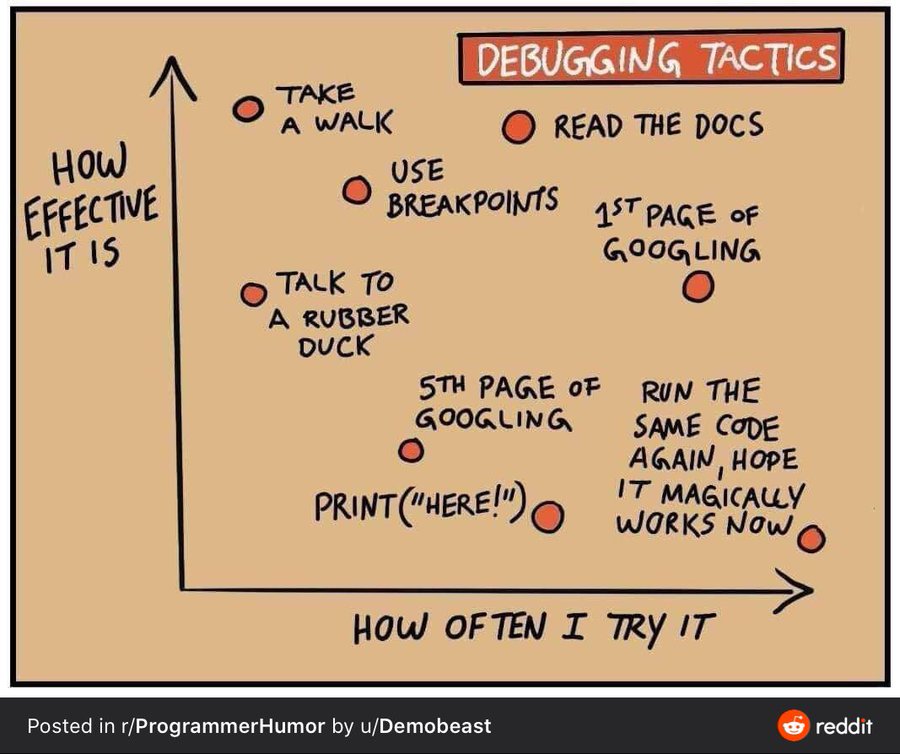
Explain the broken code out loud, line by line, to a rubber duck or a patient friend, and you will often hear your own mistake before you finish. Drop a print in to see what a variable actually holds instead of what you assume it holds. And read the docs for the function that is misbehaving. As the chart warns, running the same code again and hoping it works this time is the one move that never pays off.
Looking forward
You can now read a traceback, recognize the common exceptions, wrap risky code in try/except, and keep a loop alive when a single item fails. Two labs put both halves to work this week. Cowsay is about getting your environment right, installing packages with pip and tidying your code with a linter, the groundwork every later project assumes. Password cracking is the try/except loop in its natural home: guessing an encrypted zip file’s password by trying thousands of candidates and catching each failure until one works. Next class we point Python at the web itself and start scraping real pages, where exceptions stop being an occasional annoyance and become the thing that keeps a scraper on its feet through the messy, half-broken data of the open internet.